W3cubDocs
/Chef 18High Availability: Chef Backend
Warning
Chef Backend is deprecated and no longer under active development. Contact your Chef account representative for information about migrating to Chef Automate HA.
This document is no longer maintained.
This topic introduces the underlying concepts behind the architecture of the high availability Chef Infra Server cluster. The topic then describes the setup and installation process for a high availability Chef Infra Server cluster comprised of five total nodes (two frontend and three backend).
Overview
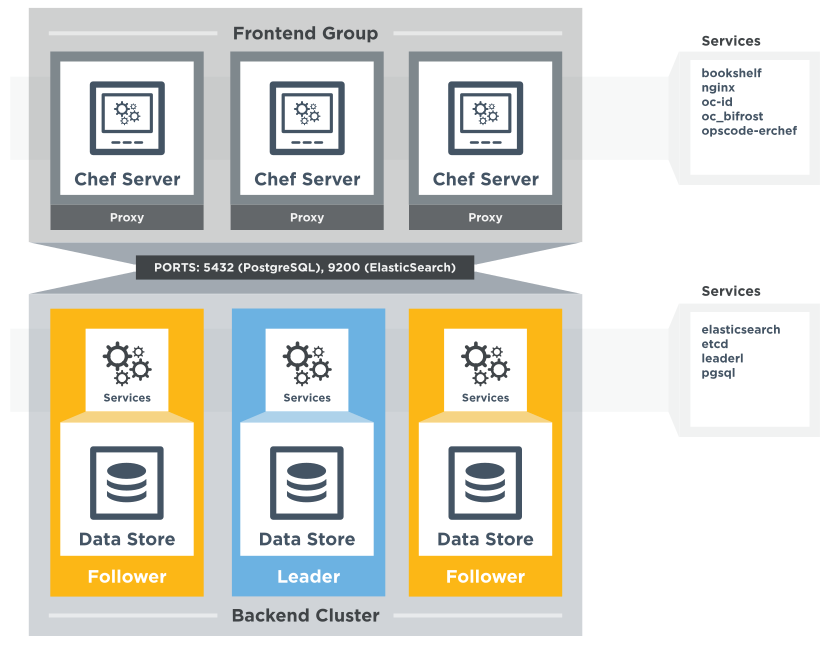
The Chef Infra Server can operate in a high availability configuration that provides automated load balancing and failover for stateful components in the system architecture. This type of configuration typically splits the servers into two segments: The backend cluster, and the frontend group.
-
The frontend group, comprised of one (or more) nodes running the Chef Infra Server. Nodes in the frontend group handle requests to the Chef Infra Server API and access to the Chef management console. Frontend group nodes should be load balanced, and may be scaled horizontally by increasing the number of nodes available to handle requests.
-
The backend cluster, comprised of three nodes working together, provides high availability data persistence for the frontend group.
Note
At this time, backend clusters can only have three nodes.
Important
Key Differences From Standalone Chef Infra Server
New in Chef Infra Server 14 Starting with Chef Infra Server 14, standalone instances use Elasticsearch for internal search. Elasticsearch provides more flexible clustering options while maintaining search API compatibility with Apache Solr.
Recommended Cluster Topology
Nodes
- The HA backend installation requires three cluster nodes. Chef has not tested and does not support installations with other numbers of backend cluster nodes.
- One or more frontend group nodes
Hardware Requirements
The following are a list of general hardware requirements for both frontend and backend servers. The important guideline you should follow are that frontend servers tend to be more CPU bound and backend servers are more disk and memory bound. Also, disk space for backend servers should scale up with the number of nodes that the servers are managing. A good rule to follow is to allocate 2 MB per node. The disk values listed below should be a good default value that you will want to modify later if/when your node count grows.
- 64-bit architecture
Frontend Requirements
- 4 cores (physical or virtual)
- 4GB RAM
- 20 GB of free disk space (SSD if on premises, Premium Storage in Microsoft Azure, EBS-Optimized GP2 in AWS)
Backend Requirements
- 2 cores (physical or virtual)
- 8GB RAM
- 50 GB/backend server (SSD if on premises, Premium Storage in Microsoft Azure, EBS-Optimized GP2 in AWS)
Warning
The Chef Infra Server MUST NOT use a network file system of any type—virtual or physical—for backend storage. The Chef Infra Server database operates quickly. The behavior of operations, such as the writing of log files, will be unpredictable when run over a network file system.
Network Services
- A load balancer between the rest of the network, and the frontend group (Not provided). Because management console session data is stored on each node in the frontend group individually, the load balancer should be configured with sticky sessions.
Network Port Requirements
Inbound from load balancer to frontend group
- TCP 80 (HTTP)
- TCP 443 (HTTPS)
Inbound from frontend group to backend cluster
- TCP 2379 (etcd)
- TCP 5432 (PostgreSQL)
- TCP 7331 (leaderl)
- TCP 9200-9300 (Elasticsearch)
Peer communication, backend cluster
- 2379 (etcd)
- 2380 (etcd)
- 5432 (PostgreSQL)
- 9200-9400 (Elasticsearch)
Installation
These instructions assume you are using the minimum versions:
- Chef Server : 12.5.0
- Chef Backend : 0.8.0
Download Chef Infra Server and Chef Backend (chef-backend) if you do not have them already.
Before creating the backend HA cluster and building at least one Chef Infra Server to be part of the frontend group, verify:
- The user who will install and build the backend HA cluster and frontend group has root access to all nodes.
- The number of backend and frontend nodes that are desired. It is required to have three backend nodes, but the number of frontend nodes may vary from a single node to a load-balanced tiered configuration.
- SSH access to all boxes that will belong to the backend HA cluster from the node that will be the initial bootstrap.
- A time synchronization policy is in place, such as Network Time Protocol (NTP). Drift of less than 1.5 seconds must exist across all nodes in the backend HA cluster.
Step 1: Create Cluster
The first node must be bootstrapped to initialize the cluster. The node used to bootstrap the cluster will be the cluster leader when the cluster comes online. After bootstrap completes this node is no different from any other back-end node.
-
Install the Chef Backend package on the first backend node as root.
- Download Chef Backend (chef-backend)
- In Red Hat/CentOS:
yum install PATH_TO_RPM - In Debian/Ubuntu:
dpkg -i PATH_TO_DEB
-
Update
/etc/chef-backend/chef-backend.rbwith the following content:publish_address 'external_IP_address_of_this_box' # External ip address of this backend box -
If any of the backends or frontends are in different networks from each other then add a
postgresql.md5_auth_cidr_addressesline to/etc/chef-backend/chef-backend.rbwith the following content where, "<NET-1_IN_CIDR>", ..., "<NET-N_IN_CIDR>"is the list of all of the networks that your backends and frontends are in. See the Configuring Frontend and Backend Members on Different Networks section for more information:publish_address 'external_IP_address_of_this_box' # External ip address of this backend box postgresql.md5_auth_cidr_addresses = ["samehost", "samenet", "<NET-1_IN_CIDR>", ..., "<NET-N_IN_CIDR>"] -
Run
chef-backend-ctl create-cluster.
Step 2: Shared Credentials
The credentials file /etc/chef-backend/chef-backend-secrets.json generated by bootstrapping must be shared with the other nodes. You may copy them directly, or expose them via a common mounted location.
For example, to copy using ssh:
scp /etc/chef-backend/chef-backend-secrets.json <USER>@<IP_BE2>:/home/<USER>
scp /etc/chef-backend/chef-backend-secrets.json <USER>@<IP_BE3>:/home/<USER>
Delete this file from the destination after Step 4 has been completed for each backend being joined to the cluster.
Step 3: Install and Configure Remaining Backend Nodes
For each additional node do the following in sequence (if you attempt to join nodes in parallel the cluster may fail to become available):
-
Install the Chef Backend package on the node.
- Download Chef Backend (chef-backend)
- In Red Hat/CentOS:
yum install PATH_TO_RPM - In Debian/Ubuntu:
dpkg -i PATH_TO_DEB
-
If you added a
postgresql.md5_auth_cidr_addressesline to the leader’s/etc/chef-backend/chef-backend.rbin Step 1: Create Cluster then update this node’s/etc/chef-backend/chef-backend.rbwith the following content wherepostgresql.md5_auth_cidr_addressesis set to the same value used in the leader’schef-backend.rb. If all of the backend and frontend clusters are in the same network then you don’t need to modify this node’s/etc/chef-backend/chef-backend.rbat all.publish_address 'external_IP_address_of_this_box' # External ip address of this backend box postgresql.md5_auth_cidr_addresses = ["samehost", "samenet", "<NET-1_IN_CIDR>", ..., "<NET-N_IN_CIDR>"] -
As root or with sudo:
chef-backend-ctl join-cluster <IP_BE1> -s /home/<USER>/chef-backend-secrets.json -
Answer the prompts regarding which public IP to use. As an alternative, you may specify them on the
chef-backend join-clustercommand line. Seechef-backend-ctl join-cluster --helpfor more information. If you manually added thepublish_addressline to/etc/chef-backend/chef-backend.rbthen you will not be prompted for the public IP and you should not use the--publish-addressoption to specify the the public IP on thechef-backend join-clustercommand line. -
If you copied the shared
chef-backend-secrets.jsonfile to a user HOME directory on this host, remove it now. -
Repeat these steps for each follower node, after which the cluster is online and available. From any node in the backend HA cluster, run the following command:
chef-backend-ctl statusshould return something like:
Service        Local Status        Time in State  Distributed Node Status
elasticsearch  running (pid 6661)  1d 5h 59m 41s  state: green; nodes online: 3/3
etcd           running (pid 6742)  1d 5h 59m 39s  health: green; healthy nodes: 3/3
leaderl        running (pid 6788)  1d 5h 59m 35s  leader: 1; waiting: 0; follower: 2; total: 3
postgresql     running (pid 6640)  1d 5h 59m 43s  leader: 1; offline: 0; syncing: 0; synced: 2
Step 4: Generate Chef Infra Server Configuration
Log into the node from Step 1 and generate a chef-server frontend node configuration:
chef-backend-ctl gen-server-config <FE1-FQDN> -f chef-server.rb.FE1
scp chef-server.rb.FE1 USER@<IP_FE1>:/home/<USER>
Note
/etc/chef-backend/chef-backend-secrets.json is not made available to Chef Infra Server frontend nodes. Step 5: Install and Configure the First Frontend
On the first frontend node, assuming that the generated configuration was copied as detailed in Step 4:
-
Install the current
chef-server-corepackage -
Copy the file to
/etc/opscodewith:`cp /home/<USER>/chef-server.rb.<FE1> /etc/opscode/chef-server.rb` -
As root, run
chef-server-ctl reconfigure
Step 6: Adding More Frontend Nodes
For each additional frontend node you wish to add to your cluster:
-
Install the current
chef-server-corepackage. -
Generate a new
/etc/opscode/chef-server.rbfrom any of the backend nodes viachef-backend-ctl gen-server-config <FE_NAME-FQDN> > chef-server.rb.<FE_NAME> -
Copy it to
/etc/opscodeon the new frontend node. -
From the first frontend node configured in Step 5, copy the following files from the first frontend to
/etc/opscodeon the new frontend node:- /etc/opscode/private-chef-secrets.json
Note
For Chef Server versions prior to 12.14, you will also need to copy the key files:
- /etc/opscode/webui_priv.pem
- /etc/opscode/webui_pub.pem
- /etc/opscode/pivotal.pem
-
On the new frontend node run:
mkdir -p /var/opt/opscode/upgrades/ -
From the first frontend node, copy
/var/opt/opscode/upgrades/migration-levelto the same location on the new node. -
On the new frontend run:
touch /var/opt/opscode/bootstrapped` -
On the new frontend, as root run:
chef-server-ctl reconfigure
Step 7: Configure the Server
Note
-
Run the following command to create an administrator:
sudo chef-server-ctl user-create USER_NAME FIRST_NAME LAST_NAME EMAIL 'PASSWORD' --filename FILE_NAMEAn RSA private key is generated automatically. This is the user’s private key and should be saved to a safe location. The
--filenameoption will save the RSA private key to the specified absolute path.For example:
sudo chef-server-ctl user-create janedoe Jane Doe [email protected] 'abc123' --filename /path/to/janedoe.pem -
Run the following command to create an organization:
sudo chef-server-ctl org-create short_name 'full_organization_name' --association_user user_name --filename ORGANIZATION-validator.pemFor example:
sudo chef-server-ctl org-create 4thcafe 'Fourth Cafe, Inc.' --association_user janedoe --filename /path/to/4thcafe-validator.pemThe name must begin with a lower-case letter or digit, may only contain lower-case letters, digits, hyphens, and underscores, and must be between 1 and 255 characters. For example:
4thcafe.The full name must begin with a non-white space character and must be between 1 and 1023 characters. For example:
'Fourth Cafe, Inc.'.The
--association_useroption will associate theuser_namewith theadminssecurity group on the Chef Infra Server.An RSA private key is generated automatically. This is the chef-validator key and should be saved to a safe location. The
--filenameoption will save the RSA private key to the specified absolute path.
Upgrading Chef Infra Server on the Frontend Machines
- On one frontend server, follow the standalone upgrade process.
- Copy
/var/opt/opscode/upgrades/migration-levelfrom the first upgraded frontend to/var/opt/opscode/upgrades/migration-levelon each of the remaining frontends. - Once the updated file has been copied to each of the remaining frontends, perform the standalone upgrade process on each of the frontend servers.
Configuring Frontend and Backend Members on Different Networks
By default, PostgreSQL only allows systems on its local network to connect to the database server that runs it and the pg_hba.conf used by PostgreSQL controls network access to the server. The default pg_hba.conf has the following four entries:
host    all         all         samehost               md5
hostssl replication replicator  samehost               md5
host    all         all         samenet                md5
hostssl replication replicator  samenet                md5
To allow other systems to connect, such as members of a frontend group that might exist on a different network, you will need to authorize that usage by adding the following line to the /etc/chef-backend/chef-backend.rb file on all of the backend members.
postgresql.md5_auth_cidr_addresses = ["samehost", "samenet", "<YOURNET IN CIDR>"]
After setting the md5_auth_cidr_addresses value and reconfiguring the server, two entries will be created in pg_hba.conf for each value in the md5_auth_cidr_addresses array. Existing values in pg_hba.conf will be overwritten by the values in the array, so we must also specify “samehost” and “samenet”, which will continue to allow systems on a local network to connect to PostgreSQL.
For example, if a frontend host at 192.168.1.3 can reach a backend member over the network, but the backend’s local network is 192.168.2.x, you would add the following line to /etc/chef-backend/chef-backend.rb
postgresql.md5_auth_cidr_addresses = ["samehost", "samenet", "192.168.1.3/24"]
which would result in the following two entries being added to the pg_hba.conf file.
host    all         all         samehost               md5
hostssl replication replicator  samehost               md5
host    all         all         samenet                md5
hostssl replication replicator  samenet                md5
host    all         all         192.168.1.3/24         md5
hostssl replication replicator  192.168.1.3/24         md5
Running chef-backend-ctl reconfigure on all the backends will allow that frontend to complete its connection.
Important
postgresql.md5_auth_cidr_addresses subnet settings must be identical for all members of the backend cluster. In the case where the subnet settings of the frontend cluster are different from the subnet settings of the backend cluster, the values set on the members of the backend cluster should contain the subnet of the frontend cluster. This guarantees that all members of a cluster can still communicate with each other after a cluster change of state occurs. For example, if the frontend subnet setting is “192.168.1.0/24” and the backend subnet setting is “192.168.2.0/24”, then the postgresql.md5_auth_cidr_addresses subnet settings must be postgresql.md5_auth_cidr_addresses = ["samehost", "samenet", "192.168.1.0/24", 192.168.2.0/24]
Cluster Security Considerations
A backend cluster is expected to run in a trusted environment. This means that untrusted users that communicate with and/or eavesdrop on services provided by the backend cluster can potentially view sensitive data.
Communication Between Nodes
PostgreSQL communication between nodes in the backend cluster is encrypted, and uses password authentication. All other communication in the backend cluster is unauthenticated and happens in the clear (without encryption).
Communication Between Frontend Group & Backend Cluster
PostgreSQL communication from nodes in the frontend group to the leader of the backend cluster uses password authentication, but communication happens in the clear (without encryption).
Elasticsearch communication is unauthenticated and happens in the clear (without encryption).
Securing Communication
Because most of the peer communication between nodes in the backend cluster happens in the clear, the backend cluster is vulnerable to passive monitoring of network traffic between nodes. To help prevent an active attacker from intercepting or changing cluster data, Chef recommends using iptables or an equivalent network ACL tool to restrict access to PostgreSQL, Elasticsearch and etcd to only hosts that need access.
By service role, access requirements are as follows:
| Service | Access Requirements |
|---|---|
| PostgreSQL | All backend cluster members and all Chef Infra Server frontend group nodes. |
| Elasticsearch | All backend cluster members and all Chef Infra Server frontend group nodes. |
| etcd | All backend cluster members and all Chef Infra Server frontend group nodes. |
Services and Secrets
Communication with PostgreSQL requires password authentication. The backend cluster generates PostgreSQL users and passwords during the initial cluster-create. These passwords are present in the following files on disk:
| Secret | Owner | Group | Mode |
|---|---|---|---|
/etc/chef-backend/secrets.json | root | chef_pgsql | 0640 |
/var/opt/chef-backend/leaderl/data/sys.config | chef_pgsql | chef_pgsql | 0600 |
/var/opt/chef-backend/PostgreSQL/9.5/recovery.conf | chef_pgsql | chef_pgsql | 0600 |
The following services run on each node in the backend cluster. The user account under which the service runs as listed the second column:
| Service | Process Owner |
|---|---|
postgresql | chef_pgsql |
elasticsearch | chef-backend |
etcd | chef-backend |
leaderl | chef_pgsql |
epmd |
chef_pgsql (or first user launching an erlang process) |
Chef Infra Server frontend
The chef-backend-ctl gen-server-config command, which can be run as root from any node in the backend cluster, will automatically generate a configuration file containing the superuser database access credentials for the backend cluster PostgreSQL instance.
Software Versions
The backend HA cluster uses the Chef installer to package all of the software necessary to run the services included in the backend cluster. For a full list of the software packages included (and their versions), see the file located at /opt/chef-backend/version-manifest.json.
Do not attempt to upgrade individual components of the Chef package. Due to the way Chef packages are built, modifying any of the individual components in the package will lead to cluster instability. If the latest version of the backend cluster is providing an out-of-date package, please bring it to the attention of Chef by filling out a ticket with [email protected].
chef-backend.rb Options
Run chef-backend-ctl gen-sample-backend-config to generate the chef-backend.rb file. This will control most of the various feature and configuration flags going into a Chef HA backend node. A number of these options control the reliability, stability, and uptime of the backend PostgreSQL databases, the Elasticsearch index, and the leader election system. Please refrain from changing them unless you have been advised to do so.
- The following settings are the only settings you should modify without guidance:
fqdn- Host name of this node.
hide_sensitive- Set to
falseif you wish to print deltas of sensitive files and templates duringchef-backend-ctl reconfigureruns. - Default value:
true. ip_version- Set to either
'ipv4'or'ipv6'. - Default value:
'ipv4'. publish_address- Externally resolvable IP address of this back-end node.
For information on all the available settings, see the chef-backend.rb documentation.
chef-backend-ctl
The Chef Infra Server backend HA cluster includes a command-line utility named chef-backend-ctl. This command-line tool is used to manage the Chef Infra Server backend HA cluster, start and stop individual services, and tail Chef Infra Server log files. For more information, see the chef-backend-ctl documentation.
© Chef Software, Inc.
Licensed under the Creative Commons Attribution 3.0 Unported License.
The Chef™ Mark and Chef Logo are either registered trademarks/service marks or trademarks/servicemarks of Chef, in the United States and other countries and are used with Chef Inc's permission.
We are not affiliated with, endorsed or sponsored by Chef Inc.
https://docs.chef.io/server/install_server_ha/