W3cubDocs
/Matplotlibmatplotlib.axes.Axes.quiver
- Axes.quiver(*args, data=None, **kwargs)[source]
-
Plot a 2D field of arrows.
Call signature:
quiver([X, Y], U, V, [C], **kwargs)
X, Y define the arrow locations, U, V define the arrow directions, and C optionally sets the color.
Arrow length
The default settings auto-scales the length of the arrows to a reasonable size. To change this behavior see the scale and scale_units parameters.
Arrow shape
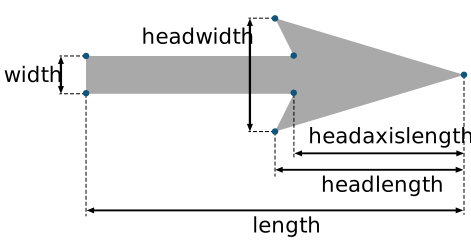
The arrow shape is determined by width, headwidth, headlength and headaxislength. See the notes below.
Arrow styling
Each arrow is internally represented by a filled polygon with a default edge linewidth of 0. As a result, an arrow is rather a filled area, not a line with a head, and
PolyCollectionproperties like linewidth, edgecolor, facecolor, etc. act accordingly.- Parameters:
-
- X, Y1D or 2D array-like, optional
-
The x and y coordinates of the arrow locations.
If not given, they will be generated as a uniform integer meshgrid based on the dimensions of U and V.
If X and Y are 1D but U, V are 2D, X, Y are expanded to 2D using
X, Y = np.meshgrid(X, Y). In this caselen(X)andlen(Y)must match the column and row dimensions of U and V. - U, V1D or 2D array-like
-
The x and y direction components of the arrow vectors. The interpretation of these components (in data or in screen space) depends on angles.
U and V must have the same number of elements, matching the number of arrow locations in X, Y. U and V may be masked. Locations masked in any of U, V, and C will not be drawn.
- C1D or 2D array-like, optional
-
Numeric data that defines the arrow colors by colormapping via norm and cmap.
This does not support explicit colors. If you want to set colors directly, use color instead. The size of C must match the number of arrow locations.
- angles{'uv', 'xy'} or array-like, default: 'uv'
-
Method for determining the angle of the arrows.
-
'uv': Arrow direction in screen coordinates. Use this if the arrows symbolize a quantity that is not based on X, Y data coordinates.
If U == V the orientation of the arrow on the plot is 45 degrees counter-clockwise from the horizontal axis (positive to the right).
- 'xy': Arrow direction in data coordinates, i.e. the arrows point from (x, y) to (x+u, y+v). Use this e.g. for plotting a gradient field.
-
Arbitrary angles may be specified explicitly as an array of values in degrees, counter-clockwise from the horizontal axis.
In this case U, V is only used to determine the length of the arrows.
Note: inverting a data axis will correspondingly invert the arrows only with
angles='xy'. -
- pivot{'tail', 'mid', 'middle', 'tip'}, default: 'tail'
-
The part of the arrow that is anchored to the X, Y grid. The arrow rotates about this point.
'mid' is a synonym for 'middle'.
- scalefloat, optional
-
Scales the length of the arrow inversely.
Number of data units per arrow length unit, e.g., m/s per plot width; a smaller scale parameter makes the arrow longer. Default is None.
If None, a simple autoscaling algorithm is used, based on the average vector length and the number of vectors. The arrow length unit is given by the scale_units parameter.
- scale_units{'width', 'height', 'dots', 'inches', 'x', 'y', 'xy'}, optional
-
If the scale kwarg is None, the arrow length unit. Default is None.
e.g. scale_units is 'inches', scale is 2.0, and
(u, v) = (1, 0), then the vector will be 0.5 inches long.If scale_units is 'width' or 'height', then the vector will be half the width/height of the axes.
If scale_units is 'x' then the vector will be 0.5 x-axis units. To plot vectors in the x-y plane, with u and v having the same units as x and y, use
angles='xy', scale_units='xy', scale=1. - units{'width', 'height', 'dots', 'inches', 'x', 'y', 'xy'}, default: 'width'
-
Affects the arrow size (except for the length). In particular, the shaft width is measured in multiples of this unit.
Supported values are:
- 'width', 'height': The width or height of the Axes.
- 'dots', 'inches': Pixels or inches based on the figure dpi.
- 'x', 'y', 'xy': X, Y or \(\sqrt{X^2 + Y^2}\) in data units.
The following table summarizes how these values affect the visible arrow size under zooming and figure size changes:
units
zoom
figure size change
'x', 'y', 'xy'
arrow size scales
—
'width', 'height'
—
arrow size scales
'dots', 'inches'
—
—
- widthfloat, optional
-
Shaft width in arrow units. All head parameters are relative to width.
The default depends on choice of units above, and number of vectors; a typical starting value is about 0.005 times the width of the plot.
- headwidthfloat, default: 3
-
Head width as multiple of shaft width. See the notes below.
- headlengthfloat, default: 5
-
Head length as multiple of shaft width. See the notes below.
- headaxislengthfloat, default: 4.5
-
Head length at shaft intersection as multiple of shaft width. See the notes below.
- minshaftfloat, default: 1
-
Length below which arrow scales, in units of head length. Do not set this to less than 1, or small arrows will look terrible!
- minlengthfloat, default: 1
-
Minimum length as a multiple of shaft width; if an arrow length is less than this, plot a dot (hexagon) of this diameter instead.
- colorcolor or list color, optional
-
Explicit color(s) for the arrows. If C has been set, color has no effect.
This is a synonym for the
PolyCollectionfacecolor parameter.
- Returns:
- Other Parameters:
-
- dataindexable object, optional
-
If given, all parameters also accept a string
s, which is interpreted asdata[s](unless this raises an exception). -
**kwargs
PolyCollectionproperties, optional -
All other keyword arguments are passed on to
PolyCollection:Property
Description
a filter function, which takes a (m, n, 3) float array and a dpi value, and returns a (m, n, 3) array and two offsets from the bottom left corner of the image
array-like or scalar or None
bool
antialiasedor aa or antialiasedsbool or list of bools
array-like or None
CapStyleor {'butt', 'projecting', 'round'}(vmin: float, vmax: float)
BboxBaseor Nonebool
Patch or (Path, Transform) or None
Colormapor str or Nonecolor or list of RGBA tuples
edgecoloror ec or edgecolorsfacecoloror facecolors or fcstr
{'/', '\', '|', '-', '+', 'x', 'o', 'O', '.', '*'}
bool
JoinStyleor {'miter', 'round', 'bevel'}object
linestyleor dashes or linestyles or lsstr or tuple or list thereof
linewidthor linewidths or lwfloat or list of floats
bool
Normalizeor str or Noneoffset_transformor transOffset(N, 2) or (2,) array-like
list of
AbstractPathEffectlist of array-like
None or bool or float or callable
float
bool
sizesnumpy.ndarrayor None(scale: float, length: float, randomness: float)
bool or None
str
list of str or None
list of array-like
unknown
bool
float
See also
Axes.quiverkey-
Add a key to a quiver plot.
Notes
Arrow shape
The arrow is drawn as a polygon using the nodes as shown below. The values headwidth, headlength, and headaxislength are in units of width.

The defaults give a slightly swept-back arrow. Here are some guidelines how to get other head shapes:
- To make the head a triangle, make headaxislength the same as headlength.
- To make the arrow more pointed, reduce headwidth or increase headlength and headaxislength.
- To make the head smaller relative to the shaft, scale down all the head parameters proportionally.
- To remove the head completely, set all head parameters to 0.
- To get a diamond-shaped head, make headaxislength larger than headlength.
- Warning: For headaxislength < (headlength / headwidth), the "headaxis" nodes (i.e. the ones connecting the head with the shaft) will protrude out of the head in forward direction so that the arrow head looks broken.
Examples using matplotlib.axes.Axes.quiver


© 2012–2023 Matplotlib Development Team. All rights reserved.
Licensed under the Matplotlib License Agreement.
https://matplotlib.org/stable/api/_as_gen/matplotlib.axes.Axes.quiver.html